Loading...
Searching...
No Matches
Usage guide
For Blueprints
Functions
- Right-click in the Blueprint graph.
- Type category label YasiuMath.
- Select the function you need.
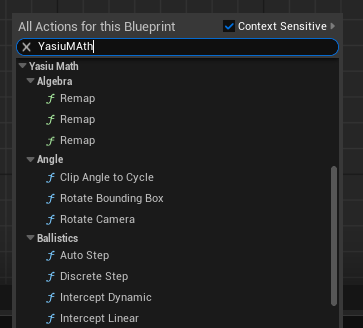 Context Menu
Function list
Random number generators
Currently most classes are made as UObjects for coding flexibility.
UObjects
They are spawned a bit different than actor components.
Squirrel Object is not treated as ActorComponent, it has to be spawned from class using node CreateFromClass
- Right-click in the Blueprint graph.
- Search for "Spawn From Class"
- Put Squirrel 13 RNG into class parameter (or PCG)
- Promote object to variable to keep it alive
- This is only required to keep object alive during gameplay and prevent UE from destroying it.
Actor components
- Create actor or use existing one
- Open actors editor window
- In tree structure click "Add" button
- Find component u want to add
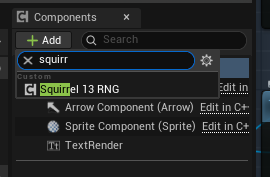
Adding component
List of unreal objects
For coding in C++
To use math functions include this in your file:
"Functions in vanilla C++";
#include "YasiuMathLib.h"
"Functions that use Unreal types";
#include "YasiuMathUnrealLib.h"
List of all functions for C++ grouped into: Name spaces
To access one of the RNG in C++, add include in your file:
It is UObject, so it must comply with unreal engine rules for objects lifecycle. Store ref value as any UObject if you want it to persist in game for longer.
/* Declaration in class, initialize this in CDO or during gameplay */
UPROPERTY()
TObjectPtr<USquirrel13_RNG> rng;
UPROPERTY()
TObjectPtr<UPCG32_RNG> rng;
Squirrel13 has also ActorComponent work with network replication.